


Best Hunting Times
2.470.00 Reviews
App Specs
- Version
- 3.6
- Updated On
- License
- $2.99
- Downloads
- 10,000+
- Developer
- K Solution
- Categories
- Weather
- Platform
- Android, iOS
Screenshots
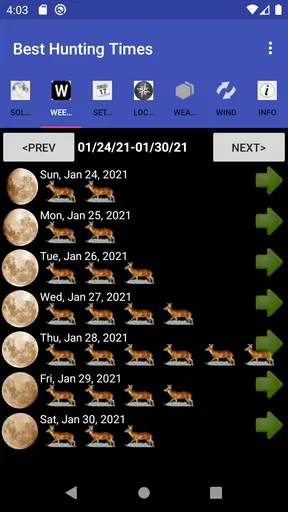
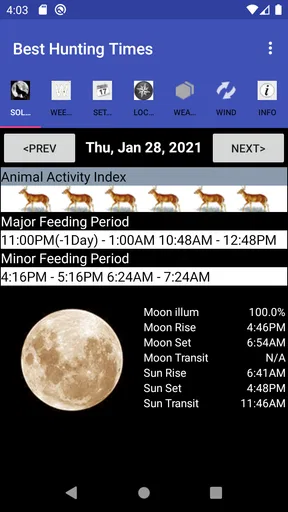
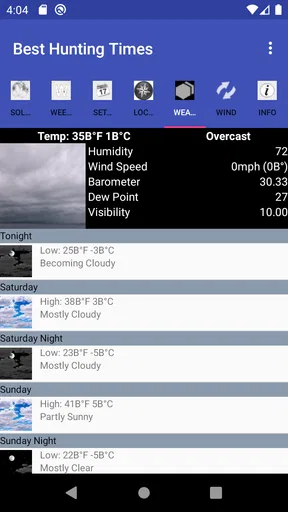
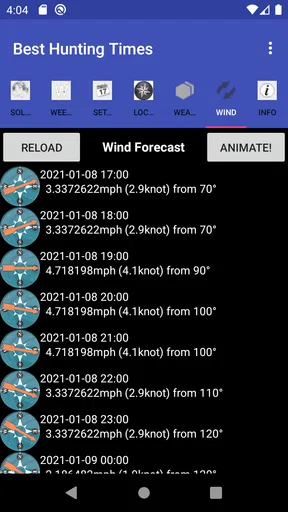
 Analysis by AppCompare
I approached Best Hunting Times as a focused weather utility rather than a full outdoor planning platform. Its purpose is narrow but useful: it helps determine favorable hunting times for a chosen date and location. That makes it appealing when I already know where I plan to be and want an additional timing reference, instead of a broad forecast filled with maps, radar layers, alerts, and unrelated information.
The app comes from K Solution and sits in the weather category. It is a paid app priced at $2.99, aimed at everyone, and the current version is 3.6. It has been available since December 16, 2011, and supports devices running Android 5.0 or later. Those details matter because this is an older, specialized tool: I would not expect the same presentation or connected forecasting experience found in newer mainstream weather apps.
My overall impression is that the idea is practical, but the experience depends heavily on entering the right information and interpreting the result sensibly. The app can be helpful for planning a hunting window, yet it should be treated as one planning aid rather than a replacement for a current forecast, local knowledge, or responsible outdoor preparation.
Where people usually get stuck
The first obstacle is understanding what the app is actually designed to answer. It is not primarily a general question such as “What will the weather be today?” Instead, it is intended to help identify potentially better hunting periods for a particular date and place. If I opened it expecting radar, hourly rain details, or a complete safety briefing, I would probably find the experience too limited.
That distinction also explains why the location and date deserve more attention than they might in a normal weather app. A small mistake in either one can make the result look unreasonable. Choosing a nearby town instead of the actual hunting area, using the wrong day, or overlooking a date setting can lead me to blame the app when the input is the real problem.
I would begin by treating the result as a timing suggestion. It can help me organize a morning or evening outing, but it does not independently establish whether travel is safe, whether visibility is acceptable, or whether conditions on the ground will be comfortable. Those questions belong to a current weather source and my own preparation.
The modest reception is worth keeping in mind. Best Hunting Times has an average rating of 2.4 from roughly 123 ratings and about 70 written reviews, with more than 10K installs. I would read that as a reason to approach it carefully, not as proof that it is unusable. A specialized app can still fit a particular routine, but the relatively small audience and low average suggest that setup clarity and device compatibility may not feel equally smooth for everyone.
Worth Reading Before You Choose

Flipboard Shows What News Apps Must Do Beyond the Feed

Switching to Android Auto Means Rethinking Your Driving Routine

Google Calendar Makes a Crowded Week Easier to Manage

Ludo King Makes the Most of the Minutes Between Plans

Baby Panda World Brings Quick Play to Modern Phones, but Its Game Library Feels Busy

ESPN’s Live Game View Makes Following Close Games Easier
Why the result may look wrong
Timing tools can seem inaccurate when the user expects them to behave like live forecasts. If the app gives a favorable period, that does not mean animals will appear, that the weather will cooperate, or that every part of a large area will share identical conditions. The output is best understood as a planning reference tied to the selected date and location.
For that reason, I would avoid making a last-minute decision from the app alone. I would check a current weather service separately, especially for wind, rain, temperature changes, visibility, and severe conditions. This is not a criticism of the app’s narrow purpose; it is simply the difference between a hunting-time calculator and a complete field-safety resource.
Setup checks that prevent most trouble
Before relying on a result, I would make the setup deliberately simple. First, I would confirm the date, then verify the location, and only after that read the suggested hunting period. This order matters because it prevents me from mentally carrying over an old selection while assuming the app has already switched to the outing I am planning.
When selecting a location, I would use the closest meaningful place available rather than automatically choosing a major city. A city forecast can represent conditions far from a rural property, wooded area, marsh, or open field. Even if the app accepts the location, that does not make the location a perfect substitute for the exact place where I will be outdoors.
I would also check the phone’s date and time settings if the displayed period seems shifted. A device with an incorrect clock, an unusual regional setting, or a date that has not updated properly can create confusion in any time-based application. This is a safe first check because it costs nothing and can explain a surprising result before I start reinstalling anything.
Another useful habit is to record the selected inputs before leaving home. I might write down the chosen date, the location label, and the recommended period. That gives me a quick reference in the field and makes it easier to notice whether I accidentally changed a setting later. It also helps separate a genuine app issue from simple memory error.
Because the app is paid, I would install it on the device I actually intend to use rather than assuming an older spare phone will provide the same experience. The minimum operating system is Android 5.0, so a compatible phone is required. Compatibility alone does not guarantee that an aging device will handle every screen comfortably, but it is the first threshold to check before purchase or troubleshooting.
A sensible first-use routine
On the first launch, I would avoid testing several dates and places at once. I would choose one familiar location and one upcoming date, inspect the result, then repeat the process with a second date only after I understand how the screen presents the information. This small routine reduces the chance of confusing a changed input with a changed calculation.
I would take a screenshot or note the result before closing the app if I needed it for a trip. That is especially practical for someone planning around limited signal. I would not assume that an outdoor location will offer dependable connectivity, so preparing a reference in advance is more sensible than trying to solve a loading problem at the trailhead.
If the app asks me to choose a location manually, I would keep the spelling and selection consistent between tests. Comparing two results is meaningful only when the date and place are controlled. Otherwise, I could mistakenly conclude that the app is inconsistent when I have actually changed two variables.
Recovering when a result or screen does not behave as expected
My recovery process would start with the least disruptive steps. I would return to the date and location fields, reselect both, and run the calculation again. If the screen still looks unfamiliar, I would close and reopen the app, then repeat the same controlled test. This is more useful than immediately changing several phone settings because it preserves a clear record of what happened.
If the result appears frozen, I would check whether the phone itself is responding normally. Opening another application can show whether the issue is isolated to Best Hunting Times or part of a wider device slowdown. I would also confirm that the app has not been left in the background for a long period before assuming that the calculation is broken.
When a date seems to produce an implausible time, I would test a nearby date using the same location. The comparison is not a scientific validation, but it can reveal an input mistake or a display misunderstanding. If only one entry behaves strangely, I would re-enter it carefully rather than trusting the first attempt.
I would be cautious about clearing app data or uninstalling immediately. Those actions can remove local settings and make it harder to understand the original problem. Since the app’s job is relatively focused, preserving a simple test case is more valuable than performing a long sequence of random fixes.
Updating the phone’s operating system is not always the right answer either. The app supports Android 5.0 and later, but an operating-system update can affect an entire device, not just this utility. I would first confirm that the phone meets the requirement, restart it, and repeat the basic date-and-location test. Only then would I consider more involved maintenance.
How I would plan around a failed or unavailable result
If I could not get a dependable result before leaving, I would not build the trip around a guess. I would use a general weather service for current conditions and rely on a written plan that includes a flexible departure window. The app is useful when it works as a timing reference, but the outing should remain viable without it.
For repeated trips, I would keep a small log of the selected date, location, suggested period, and what conditions were actually present. This is one of the more valuable ways to use a limited app: not by expecting it to explain every field outcome, but by comparing its timing guidance with personal observations over time. The log can reveal whether the tool fits my particular routine better than a single isolated test can.
I would also avoid treating a favorable period as a guarantee. Wildlife behavior is affected by many factors, and the app’s narrow output cannot account for every local detail. A useful workflow is to combine its timing suggestion with legal requirements, land access, daylight awareness, weather checks, and a realistic travel plan.
When the app is not the cause
Some frustrations will come from the environment rather than the application. A location label may be technically correct but geographically unhelpful. A weather pattern may change after the app’s timing guidance has already been calculated. A phone may show the wrong date. A user may also expect a precise prediction from a tool that is better suited to identifying broad planning windows.
This distinction is important because no timing calculator can replace local judgment. If the wind is unsafe, roads are poor, visibility is low, or conditions change rapidly, I would postpone or adapt the outing regardless of what the app suggests. The most responsible use is to let the timing information support a decision, not make the decision by itself.
I would skip this app if I wanted a modern all-in-one weather experience. Someone who depends on radar, severe-weather notifications, detailed hourly forecasts, interactive maps, or rich location tracking will likely be happier with a current mainstream weather application. Best Hunting Times is too specialized to serve that broader role.
I would also skip it if I rarely plan hunting trips or dislike entering information manually. The value comes from a specific use case, and the $2.99 purchase makes less sense for someone who will open it only once. A free general weather app may be the better choice for occasional outdoor planning, especially when current conditions matter more than hunting-time guidance.
On the other hand, I can see the appeal for a hunter who prefers a compact, purpose-built reference and already uses another service for weather. The paid model may be acceptable when the app’s narrow function fits a repeated routine. Its Everyone rating also makes it broadly accessible from an age-classification standpoint, although responsible outdoor use still depends on the user’s judgment and local rules.
How it compares with ordinary weather apps
A normal weather app answers questions about temperature, precipitation, wind, and changing conditions. Best Hunting Times approaches the problem from a different direction by focusing on when a hunting outing may be more worthwhile. In my view, the two types work better together than as substitutes.
The ordinary weather app is stronger for deciding whether I should travel at all. This specialized tool is more useful after I have narrowed the trip to a particular date and place and want another way to organize the day. If I had to keep only one application, I would choose the general weather service for safety and everyday usefulness. If hunting timing is a regular part of my planning, this app can fill a more specific gap.
The trade-off is convenience. A general service often explains conditions in familiar visual language, while a specialized calculator may require more attention from the user. That extra effort is worthwhile only when the timing output changes how I plan the outing. If I already know my schedule is fixed, the app may add little beyond curiosity.
My practical verdict
After looking at the way this app fits into a real planning routine, I see Best Hunting Times as a narrowly useful companion rather than a complete outdoor weather solution. Its strongest quality is focus: it gives hunters a way to examine timing for a selected date and location without turning the task into a large forecasting dashboard.
The main friction is equally clear. I need to enter and verify the basics carefully, understand that the result is guidance rather than certainty, and keep a separate source for current weather and safety information. If I skip those steps, an incorrect location, stale expectation, or changing conditions can make the app appear less useful than it really is.
My preferred workflow would be to test one familiar location, confirm the date, note the recommended period, and then compare that plan with a current forecast before leaving. For recurring trips, I would keep a simple record of results and field observations. That approach turns the app from a one-click promise into a modest but potentially useful planning reference.
My recommendation is conditional: hunters who regularly plan around specific dates and locations may find the $2.99 price reasonable, especially if they already have a separate weather app. Casual users, people seeking live forecasts, and anyone expecting detailed outdoor safety information should choose a broader alternative instead.
In short, I would use it as one piece of preparation, not as the final authority. Its age, focused design, and low average rating mean I would test it carefully on my own device before depending on it for an important trip. When its limited role matches my needs, that simplicity is useful; when I need current, comprehensive weather information, another app is the better tool.
Pros
- Simple interface makes hunting time predictions easy to check.
- Useful sunrise and sunset data for planning trips.
- Moon-phase information can support wildlife activity planning.
- Lightweight app that should work well on older devices.
- Helpful for organizing outings around changing daylight conditions.
Cons
- Predictions may vary by location and may not reflect local wildlife behavior.
- Some features may require an internet connection or location access.
- Weather conditions are not always included in hunting-time calculations.
- Accuracy depends on correctly setting your location and time zone.
- The app may feel limited for hunters wanting maps or detailed field tools.
FAQs for Best Hunting Times
What is Best Hunting Times, and how does it work?
Best Hunting Times is a hunting-planner app designed to help users identify potentially favorable periods for hunting based on factors such as date, location, sunrise, sunset, moon phases, and other time-related conditions. After opening the app, you generally select or confirm your area and review a daily or calendar-style forecast. It is intended as a planning aid rather than a guarantee of animal activity or hunting success.
Does Best Hunting Times require an internet connection or GPS access?
The app may use your device’s location to provide more relevant sunrise, sunset, moon, and hunting-time calculations, although you may also be able to enter a location manually. An internet connection can be useful for downloading updates, maps, or location data, depending on the version installed. Before relying on it in the field, check whether the information you need remains available offline and confirm that location permissions are enabled correctly.
Can Best Hunting Times be used for different types of hunting?
Best Hunting Times can be useful for hunters planning a variety of outings because its recommendations are mainly based on time, astronomical conditions, and location. However, the app may not provide detailed species-specific guidance for every animal, region, or hunting method. You should treat its predictions as general planning information and combine them with local wildlife behavior, seasonal regulations, weather conditions, and your own experience.
Are the hunting predictions in Best Hunting Times accurate and reliable?
The app can provide convenient calculations for moon phases, daylight periods, and suggested activity windows, but no mobile application can predict wildlife movement with complete accuracy. Animal behavior is affected by weather, food availability, pressure from hunters, habitat, temperature, and many local factors. Use Best Hunting Times as one part of your preparation, verify important information independently, and avoid interpreting its ratings as a promise of success.
Is Best Hunting Times free to download, and are there in-app purchases?
The availability of free features, advertising, and optional paid tools can vary according to the platform, region, and current app version. Before downloading, review the listing on Google Play or the App Store to check the price, subscription details, advertisements, and any in-app purchases. Also examine the permissions requested and the privacy information, particularly if the app stores saved locations, hunting notes, or other personal data.


